|
|
|
|
|
A.4.4. CD/DVD Library |
Top Previous Next |
|
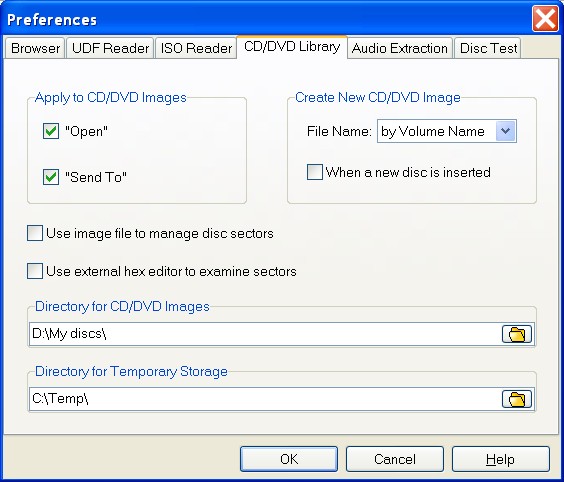
Apply To CD/DVD Images, group of options : - "Open" (default value Checked); - "Send" (default value Checked); When Checked the program tries to apply an appropriate command to the created CD(DVD) image.
File Name (default value by Volume Name) The File Name can be created either by choosing the Disk Volume Name (by Volume Name mode) or summarizing the word 'CDIM' with four random digits (Random mode) or typing CD(DVD) Image name manually (Manual mode).
When a new disc is inserted (default value Unhecked) When Checked the program creates CD/DVD Image for a newly inserted disc.
Use image file to manage disc sectors (default value Unhecked) If Checked, the program will create and then use an own image file to manage the disc data. Here, image file means a combination of .tbl and .dat files having the same name before file extension. There are 2 big advantages of image file. First, some CD and DVDs can be "poor-written". Often, one CD/DVD drive can read only a part of such disc. If another CD/DVD drive can access to the bad sectors, CDRoller simply adds a new data to the image file created before. In other words, you get the best out of each and every drive you use. Second, if you intend to read the disc twice, you get much greater speed, having the image on your hard drive. Especially, when there are bad sectors on CD or DVD.
When you insert the disc, you are prompted to type image file name that will be associated with this disc. We recommend to use friendly and unique name that simply tells about content of inserted disc. For example, 'My photo album 2010' or 'My trip to Canada in 2010'. Further, the program will create .tbl and .dat files and use them to manage disc data.
Use external hex editor to examine sectors (default value Unhecked) When Checked, you can use an external hex editor to examine disc sectors. For example, WinHex, FlexHex, Hex Workshop, HxD or others.
Directory for CD/DVD Images (My Documents directory path by default) Assigns the directory on your Hard Disk Drive (HDD) to store the created CD/DVD Images.
Directory for Temporary Storage (default value Windows Temporary Directory) Assigns the directory on your HDD to be used as Temporary Storage for drag-and-drop and Open operations.
Warning. Please do not select "Directory for Temporary Storage" as destination folder for Recover All and Recover Selected operations. When you close CDRoller, the program automatically cleans out this temporary folder, and all recovered files and subfolders will be lost! |
|
|
|
|
|