|
|
|
|
|
6.5. Recovering files |
Top Previous Next |
|
To recover the found files and folders, you can use Recover All and Recover Selected options, or simply drag and drop selected items to the destination you have chosen on your HDD.
When selecting Recover All / Recover Selected options, the program displays a Data Recovery dialog similar to the one shown here.
Key Features.
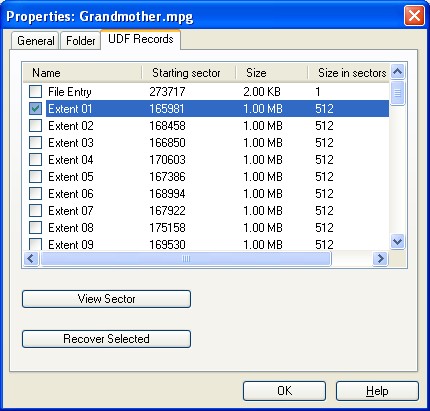
If UDF file consists of the different fragments (so called "extents"), you have the opportuntiny to recover each extent separately. Right click the file and select Properties command from the next (pop-up) menu. Go to the UDF Records tab in the Properties dialog.
Select the file extent and click Recover Selected button. After the process is completed, just rename the recovered .dat file to the file with required extension. For example, simply assign .vro, .vob or .mpg extension for video file. A small advice. To change a file's extension in the Windows Explorer, simply right click the file and select Rename in the next (pop-up) menu. |
|
|
|
|
|