|
|
|
|
|
A.4.5. Audio Extraction |
Top Previous Next |
|
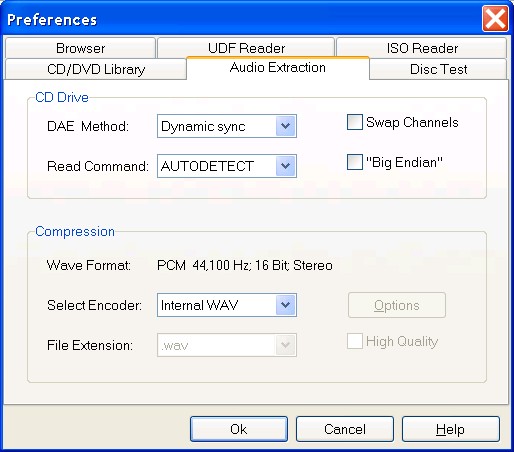
DAE Method (default value Dynamic Sync Width) With the help of Dynamic Sync Width method, the program tries to synchronize a new audio data with previously read block of audio sectors by changing overlap area between two consecutive read blocks. Fixed Sync Width means that a set amount of frames is used for blocks synchronization. Read error detection and lost synchronization control are in the both methods. The audio extraction by Burst Copying method is the fastest. Burst copy doesn't use any synchronization and error correction.
Read Command (default value AUTODETECT) If AUTODETECT (recommended setting) option has been selected, the program tries itself to find an appropriate read algorithm for user's CD drive. SCSI READ CD function is the base command recommended by SCSI-3 Standard for reading audio frames. It is supported by all ATAPI drives that have DAE feature, and some SCSI devices. SCSI READ (10) function may be used for DAE on SCSI drives support SCSI-2 Standard. Note. The list of audio read commands used by program in AUTODETECT mode is not limited by two ones mentioned above. Some known read functions are absent in the selection list because a wrong chosen extraction command may cause problems on some SCSI systems.
Swap Channels (default value Unchecked) When checked, the program itself will exchange left and right channels in the audio samples before writing them into output file. This may be suitable for some CD drives to exchange stereo channels while extraction.
"Big Endian" (default value Unchecked) Motorola " Big Endian" mode is often used on drives from Grundig, IMS, Kodak, Ricoh and some others. WARNING. Check this option only if the extracted output file seems to consist of noise!
Wave Format (default value 44,100 Hz; 16 Bit; Stereo) Indicates a brief description of audio compression format that has been selected.
Select Encoder (default value Internal WAV) Assigns an appropriate encoder from the list of available ones.
File extension (default value .wav) Indicates the extension of output file (.wav, .mp3 or .raw).
Options Activates an options dialog box to select an audio compression format.
High Quality (default value Unchecked) For some audio compression formats, specifying this flag may improve the audio quality or other characteristics. |
|
|
|
|
|